Audience
See the feature page: your audience.
Audience is your list: everyone who has handed over an email address on your page, what state each of them is in, and one button that hands the whole thing back to you as a CSV.
The summary
Four numbers sit above the table, and the line under the heading says the two that matter most: how many are subscribed, and how many are still waiting to confirm.
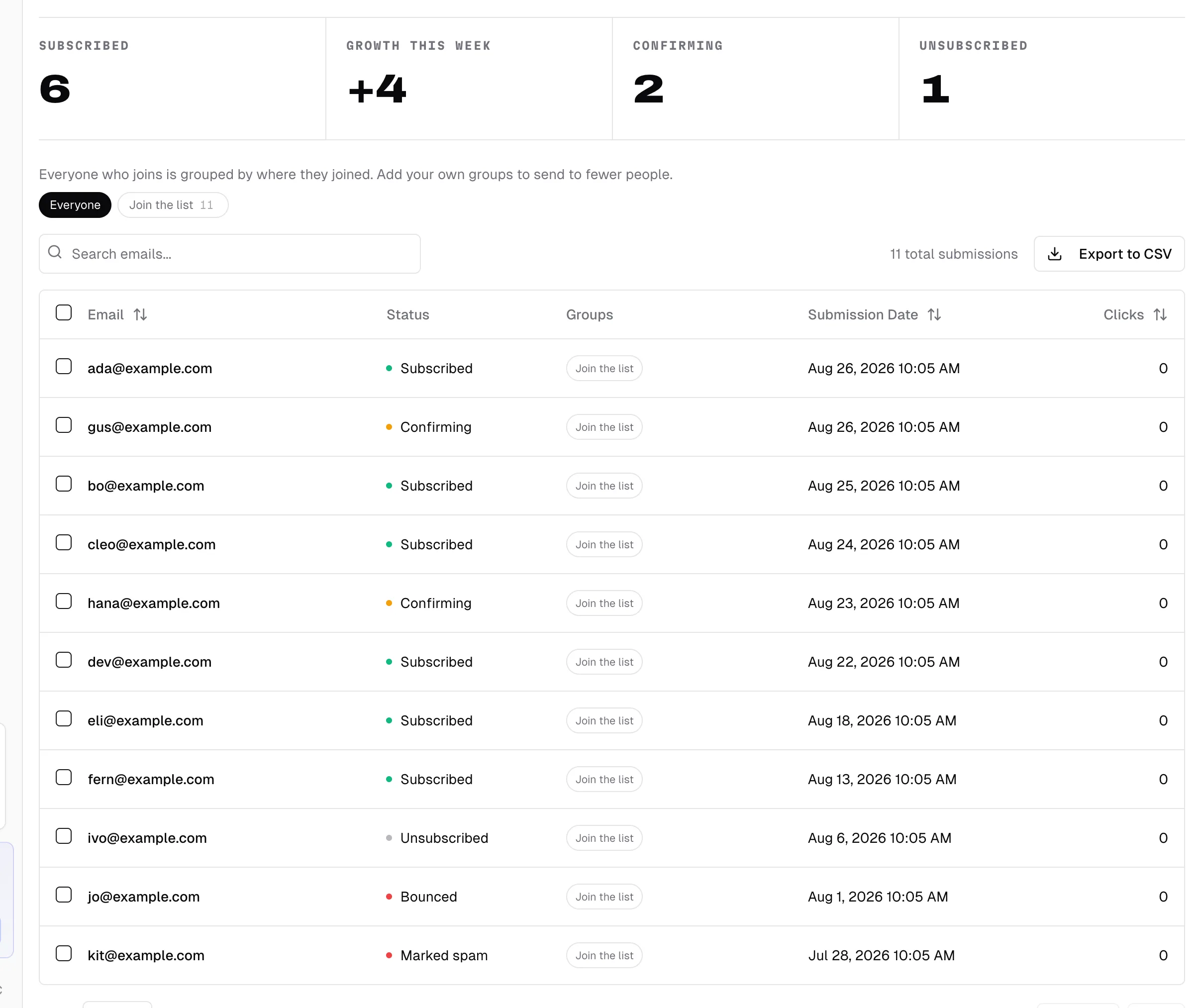
- Subscribed is the list. These are the addresses that have confirmed, and the only ones a post ever reaches.
- Growth this week is how many of them joined in the last seven days.
- Confirming is addresses that arrived but have not tapped the link in the confirmation email yet. They are on your page's record and not on your list.
- Unsubscribed is people who have opted out. They stay in the table so the same address cannot quietly come back through an import.
Two more states show up in the table without a counter above it: Bounced, where the address did not accept mail, and Marked spam, where somebody reported a post. Both are permanent, both are skipped by every send, and both are the reason the counts above and the number of rows below do not match.
The table
Every submission, newest first, with five columns: Email, Status, Groups, Submission Date, and Clicks. Email, Submission Date, and Clicks all sort; click the arrows in the header.
The header stays put while you scroll down the list. On a narrow screen the row's checkbox and address stay put as one block while the other columns scroll sideways behind it, so a row always shows whose it is, and on a phone that block carries the status dot too: the colour tells you the consent state without scrolling over to Status.
The box at the top left searches the addresses and the dates together, so "gmail" and "Aug 12" both work. The count beside it is your whole list, not the page you are looking at. Under the table, Show sets 25, 50, or 250 rows at a time.
If you have a contact form block, its replies are listed separately underneath as Form replies, and those can be deleted individually. Subscriber rows are the list itself and are not deleted from here.
Groups
Above the search box sits a row of chips, and one sentence saying what they are: "Everyone who joins is grouped by where they joined. Add your own groups to send to fewer people."
A group is a name and nothing else. Nothing is configured, nothing nests, and there are no rules to write: somebody is in a group or they are not. (Not to be confused with the Section block on your page, which is a container other blocks sit inside.)
Groups that make themselves. Everybody is in exactly one, taken from where they joined:
- The title of the email capture block that collected them, so a block called "Sunday letter" makes a group called Sunday letter. Rename the block and the group is renamed everywhere at once, because the name is read off the block rather than stored.
- Imported, for anyone who arrived through a CSV.
- Joined on the page, for anyone who joined before urls.bio recorded which block collected them, on a page with more than one email block. With a single block, they take that block's name instead.
Those chips carry no pencil. They cannot be renamed or deleted, and the messages say why: "That group is named after the block that collects it. Rename the block instead." Rename the block, or take it off the page.
Groups you make. Tick the rows you want, and a bar appears with the count and three buttons: Add to group, Remove from group, and Clear. Add to group lists the groups you have already made and gives you a field, New group, for a new one. Pressing a name is the whole interaction; there is no save button, and the message afterwards says what actually happened, "Added 12 people to VIPs" or "Everyone selected was already in VIPs".
Names run to 40 characters and are matched without case, so typing "vips" when "VIPs" exists joins the group that is already there rather than making a second one. Somebody can be in as many of your groups as you like, on top of the one they joined through.
The pencil on your own chips opens Rename and Delete, with the important part written under them: "Deleting a group removes the group, never the people in it." Renaming a group onto another one of yours merges the two, which is usually what renaming into an existing name means.
Filtering. Press a chip and the table shows that group, and the count line changes from "1,284 total submissions" to "184 in VIPs". One group at a time: press it again, or press Everyone, to clear it. The header checkbox selects the page you are looking at rather than the whole list, which is deliberate.
Groups are also a column in the table, and a column in the export.
Exporting
Export to CSV, at the top right of the table, downloads email_submissions.csv with a row per submission:
Email,Date Submitted,Clicks,GroupsGroup names are joined with semicolons rather than commas, because a group is allowed a comma in its name and a spreadsheet should not have to guess.
It covers everything, not the page you are on and not the search you have typed. It is your list; take it wherever you want it.
Importing a list
If you already have a list somewhere else, you can bring it in. Import CSV sits at the top of the newsletter tab, and it unlocks on Pro after five clean sends, so it is not the first thing you do with the account.
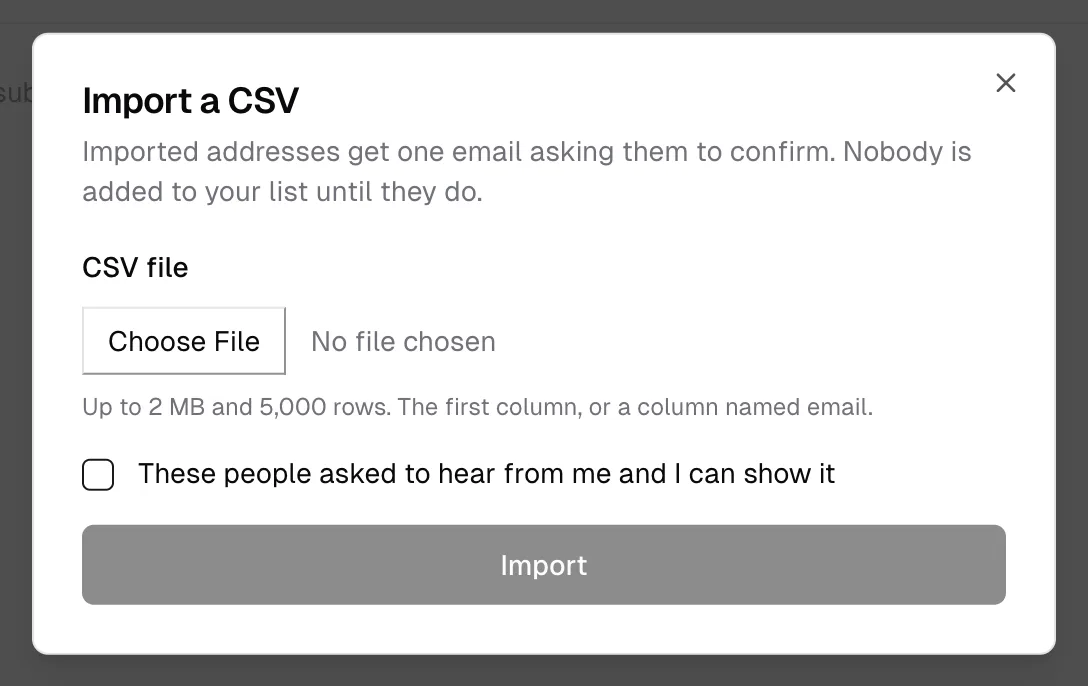
The dialog says what happens before you choose a file: "Imported addresses get one email asking them to confirm. Nobody is added to your list until they do."
- The file. Up to 2 MB and 5,000 rows. urls.bio takes the column named email, or the first column if there is no header. Commas, semicolons, and tabs all work.
- The attestation. The checkbox reads "These people asked to hear from me and I can show it", and it is a real gate rather than a formality: the server refuses the import without it. Bought lists, scraped lists, and "everyone who ever emailed me" are what it exists to stop.
- Import. Nothing sends until both the file and the checkbox are there.
Then, address by address:
- A valid new address is added as Confirming and sent one email asking it to confirm. That email says who you are and that doing nothing means never hearing from you again.
- An address already on your list, in any state, is counted as a duplicate and skipped. That includes bounced and unsubscribed ones, which is the point: an import must not be a way to bring back somebody who left.
- Anything that is not shaped like an address is counted as invalid and skipped.
The result screen tells you all of it: how many were imported, how many are being asked to confirm now, how many go out over the next day, and how many were duplicates or not addresses. The confirmation emails are metered against your daily sending limit, which is why a big import is spread over a day rather than sent at once.
Nobody joins your list on import. They join when they confirm, and only then.
The welcome email
Welcome email, next to Import CSV, is one email sent the moment somebody confirms.
It is on by default, with a subject and a short message you can rewrite. The help under the switch says what off means: "Off means a confirmed subscriber hears nothing until your first post." Blank lines start new paragraphs, your page's theme does the rest, and Send me a test puts the draft on screen into your own inbox before you save it.
It goes from your sending address, so replies come to you, and it carries an unsubscribe link like every other email you send.
When something has not synced
Two different things can be behind "the address is not where I expected it".
Your email tool. Integrations fire once, at the moment somebody confirms, and they fail quietly: a wrong key produces no error anywhere. There is no retry queue and no sync status. Check Audience first; if the address is there, capture worked and the problem is downstream. Then check that you are on Pro, that both fields for the provider are filled, and that the key is still valid. Confirm it by submitting a test address on your own page from a private window and watching for it on the other side.
Your sending address. If Settings shows Emails as Failed, that is the domain rather than the list, and there is a Retry button on the row. See newsletter.
Common questions
Why is somebody stuck on Confirming? They have not tapped the link in the confirmation email. It is usually the spam folder. Nothing you do from here moves them; they have to confirm it themselves.
Can I delete an address? Form replies can be deleted. Subscriber rows cannot, because the record of an unsubscribe or a bounce is what stops that address being mailed again. Export the list if you want a copy you can edit.
Does the export include unsubscribes? Yes. It is every submission, with the date. Filter it wherever you take it.
Why does the import say duplicate when I know that address is new to my list? It was on your page's record already, in some state. An address that bounced or unsubscribed a year ago still counts.
Can I delete the group somebody joined through? No. It is the title of the email capture block that collected them, so renaming or removing the block is the way to change it. Your own groups have a pencil; those do not.