Sharing your page
See the feature pages: your own domain and QR code.
One link everywhere you post is the whole point. This page covers getting urls.bio/yourname into the places that matter, the share control built into your page, and what other people see when your link lands in a feed or a message.
Your address
Your page lives at urls.bio/yourname, a single top-level address with nothing in front of it.
Handles are stored lowercase and looked up lowercase, so urls.bio/YourName and urls.bio/yourname reach the same page. Write it however reads best in your bio.
There is no trailing anything to remember, no query string to carry, and no separate short link to keep track of. The address is the whole product.
Copying it
Four places give you the link without typing it:
- The dashboard header. The button at the top right of My Page shows your address and opens the live page in a new tab.
- Cmd+K, then "Copy my page link". Works on any dashboard tab.
- The setup checklist. The "Share your page" row copies the link and ticks itself.
- The share control on the page itself. Covered next.
The share control
Every public page carries a round share button in its top right corner, on desktop and on mobile. It opens a sheet on a phone and a dialog on anything wider, with the same things in both.
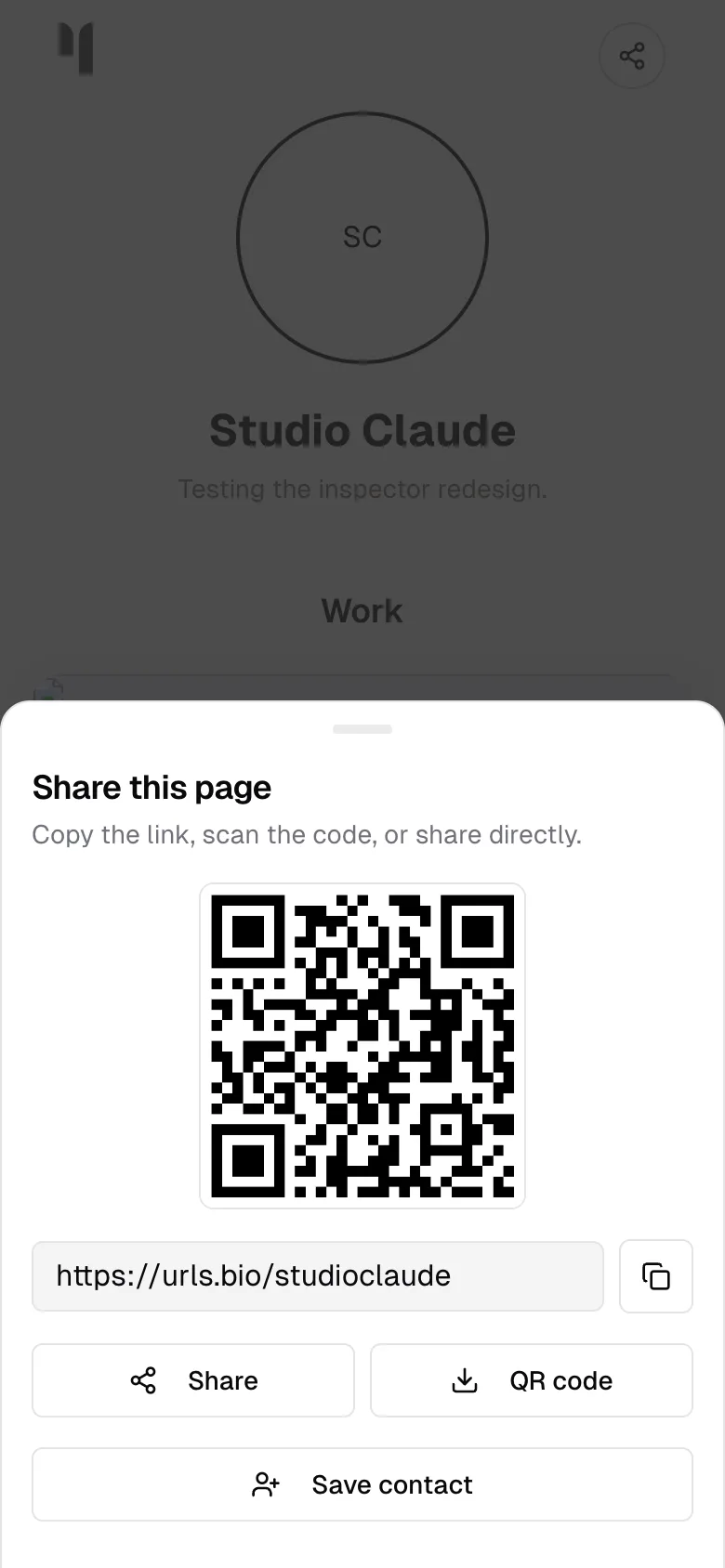
It is titled "Share this page", with "Copy the link, scan the code, or share directly." underneath, and holds five things:
- A QR code. Generated in the browser at 512 pixels square, black on white. Point a phone at it and the page opens. Nothing is fetched from anywhere to make it.
- The link itself, in a field that selects the whole address the moment you touch it, with a copy button beside it that turns to a green tick for a couple of seconds.
- Share. Hands the link to your device's own share sheet, titled "Your name on urls.bio", so it goes straight into a message, a story, or a note. On a browser with no share sheet, this copies instead.
- QR code. Downloads the code as a PNG called
yourname-urls-bio-qr.png, at the full 512 pixels rather than the size on screen. Big enough for a slide, a poster, or the back of a card. - Save contact. Builds a vCard on the spot and downloads it as
yourname.vcf, carrying your name, your page address, your bio, and your avatar. Whoever taps it gets you in their contacts with your page attached.
Opened inside another app's browser, the one in Instagram or TikTok for instance, downloads do not work, so those three buttons are replaced by a line saying so: copy the link there, or open the page in Safari or Chrome for the QR code and the contact card.
None of this needs an account, so anyone reading your page can use all of it. That includes you: the fastest way to get your own QR code is to open your page and tap share.
Sharing one link
The share control shares your page. A single block can be shared on its own: link, file download, embed, tickets, discount code, and direct chat blocks carry a small i that opens the block's details, and the sheet has its own share row with Copy, WhatsApp, Messages, X, Email, and More. Those send the block's destination, not your page address, with the note you wrote on the block as the message. Every copy or share made there is counted in the Shares column of analytics. See block details for the whole sheet.
If your page has tabs, the address can name one: urls.bio/yourname#shows opens the page on Shows. Switching tabs on the page updates the address, so whatever a visitor copies out of their browser carries the tab they were reading.
Putting the link in a bio
Instagram, TikTok, X, and YouTube all have a website or link field in their profile editor. Paste urls.bio/yourname into that field rather than into your bio text: the field is tappable everywhere, and bio text often is not. The https:// is optional; the address works with or without it, and reads better without.
The same address goes in an email signature, a newsletter footer, a podcast description, or the last slide of a talk. It is plain enough to read out loud, which is more than most links manage.
Use the same address in every one of those places. That is what lets the Sources panel in analytics tell you which platform is actually carrying your traffic, and it is the reason to have one link rather than five.
What people see when your link is shared
Paste your address into iMessage, Slack, X, or anywhere else that unfurls links, and urls.bio draws a preview card for it: 1200 by 630 pixels, painted in your own theme, with your avatar, your name, your bio, and urls.bio/yourname along the bottom. If your account is verified the badge is drawn there too.
The card is generated fresh from your page, so changing your avatar, your name, or your colours changes the card. It is the same on Free and on Pro, and the urls.bio badge setting does not affect it.
Two other things travel with the link:
- The title and description. By default, the title is your name followed by
| urls.bio, and the description is your bio, or "Check out Your Name's links on urls.bio" if you have not written one. On Pro you can set both yourself in Settings, under Page: Page title, up to 70 characters, and Search description, up to 200. See settings. - The browser bar colour. Your background colour is handed to the browser as the theme colour, so on a phone the chrome around your page picks it up.
Bear in mind that the platforms cache these cards on their side. A preview that looks out of date after you change your avatar is usually their copy, not yours, and it refreshes on their schedule rather than on request.
Apple Wallet
On an iPhone, iPad or Mac, the share sheet has Add to Apple Wallet. It puts a pass in the wallet carrying your handle, your name, and a scannable code that opens your page. Part of Pro.
The pass wears your page's own colour, so it looks like your page rather than like ours, and the urls.bio glyph sits in the header.
It is the fastest way to hand somebody your page in person: the wallet opens from the lock screen, and the code scans from a phone held across a table.
It never goes out of date, because there is nothing on it that changes. It carries your address, and your address is what stays the same while everything on the page moves. If you change your handle, though, the old pass stops working along with the old address, so add a new one.
A scan is counted separately in analytics, so you can see how much of your traffic came from somebody's wallet rather than from a link.
Custom domain
On Pro you can serve your page from a domain you already own, either the domain itself like example.com or a subdomain like links.example.com.
Open Settings, find the Custom domain card, type the domain, and press Connect. The card then shows the DNS records to add, with a copy button on each value:
- For a domain like
example.com, an A record on@pointing at76.76.21.21. - For a subdomain like
links.example.com, a CNAME record onlinkspointing atcname.vercel-dns.com.
Occasionally a TXT record appears alongside them. That is an ownership check, and it only shows up when the domain is already in use elsewhere on our hosting.
Add the records at whoever you bought the domain from, then come back and press Refresh. The status line reads "Waiting for DNS: add the record above" until the records resolve and "Connected" once they do. DNS propagation is not instant: a few minutes is common, and some registrars take hours. Nothing is broken while you wait.
The HTTPS certificate is issued and renewed for you once the domain resolves, so there is nothing to buy, upload, or renew.
A few things worth knowing:
- Your page keeps working at
urls.bio/yournameas well. The custom domain is an additional address, not a replacement. - Once a domain is connected, it becomes the canonical address search engines are pointed at.
- Only the page itself is served on your domain. The dashboard, sign in, and everything else stay on urls.bio, and visiting one of those paths on your domain sends you back to urls.bio.
- Remove asks for confirmation, then takes the domain off immediately. You can connect it again later.
- A domain can only be connected to one urls.bio page at a time.
Password protecting your page
On Pro you can put a passcode in front of your page. Open Settings, find the Page passcode card, type a passcode of at least four characters, and press Save. Anyone who opens your page after that meets a gate in your own colours: your name, your avatar, an optional hint, one field, and an Unlock button. Nothing else is on the page, and nothing else is in the response, so the links themselves are not sitting in the HTML waiting to be read.
The hint is there because a passcode you have to explain twice a day is a passcode you stop using. It is shown to everyone who reaches the gate, so write it for the people you gave the code to, not for strangers: "the usual one" is a good hint and "1234" is not.
A few things worth knowing:
- You are never locked out of your own page. Signed in as yourself, your page opens normally.
- Visitors stay unlocked for thirty days on the device they used. Changing the passcode ends every one of those sessions immediately.
- A locked page is not indexed. It is marked noindex while the passcode is on, and its search description reads "This page is private" rather than your bio.
- The passcode is stored as a one-way hash, never as text. We cannot tell you what it was, so if you forget it, set a new one.
- Remove takes the passcode off and opens the page again. That works whatever your plan is: if Pro lapses while a passcode is set, the page opens rather than trapping your audience behind a gate you can no longer manage.
The card itself is in settings.
Search engines
Your page is indexable by default, and every active page is listed in the urls.bio sitemap. Each one declares its own canonical address. If you have connected a custom domain, that is the address declared as canonical.
What your page tells search engines
Every page carries structured data describing you: your name, your handle, your bio, your avatar, and the profiles behind your social icons, which is the strongest signal there is that the person on this page is the same person as the one on those.
Your blocks add to it, so filling one in is also how your page starts showing up with detail attached rather than as a bare link:
- Events become dated events, each with its venue, its city, and, when the row has a ticket link, whether it is on sale or sold out.
- Location becomes a business listing with your address on it, and your Hours fold into that listing as opening times. Hours on their own do not, because a page that says "open until 6" without saying where is not describing a place.
- Menu becomes a menu, with your sections, your items, and the prices that are actually prices. "Market price" stays as words.
- FAQ blocks become questions and answers. Every FAQ block on the page contributes to one list, which is what search engines want.
Only what is on your page is described. A block set to hidden, one whose schedule has passed, and a Pro block on a page that is not Pro are all absent from your page and absent from this too.
Dated exceptions in Hours are the one deliberate omission. They are exceptions with a lifetime measured in days, and a cached page cannot promise to retract one in time.
If you have turned the archive on, each sent post is a page of its own too, at urls.bio/yourname/p/its-subject. See newsletter.
If your page is not showing up, the usual reason is time rather than configuration. Search engines get to new pages when they get to them.
Changing your handle
You can change your handle in Settings, in the URL field of the Profile card. It asks first, and it is worth reading what it asks:
Your page will move to urls.bio/newname. The old address, urls.bio/oldname, will stop working immediately, and anyone holding the old link will see a not-found page.
There is no redirect from the old address. Anything you have already put in a bio, printed on a card, or handed out as a QR code stops working the moment you confirm. If you change your handle, plan on updating every bio the same afternoon, and regenerating any QR code you have printed.
Common questions
Do I have to do anything to get structured data? No. It is built from the blocks you already have, every time the page renders. Adding an address or a set of hours is the whole action.
Will this get me a rich result? It makes one possible. Search engines decide what they show and when, and nobody can promise a result on their behalf.
Can I use my own domain? Yes, on Pro. Add it in the Custom domain card in Settings, add the one DNS record it shows you at your registrar, and the certificate is handled for you. Your page stays reachable at urls.bio/yourname either way.
Does the QR code stop working if I change my colours or my avatar? No. The code encodes your address and nothing else, so it keeps working as long as the address does.
Is the QR code themed to my page, and can I get it as an SVG? No to both. It is black on white, which is what scanners are most reliable with, and the download is a PNG at 512 pixels square, which prints cleanly at a normal card or poster size.
The QR and contact buttons are missing. You are in an app's own browser, which blocks downloads. Open the page in Safari or Chrome.
Does urls.bio count how many people share my page? No. Shares are not tracked. What is tracked is the traffic that arrives afterwards, which is what the Sources panel in analytics reads.